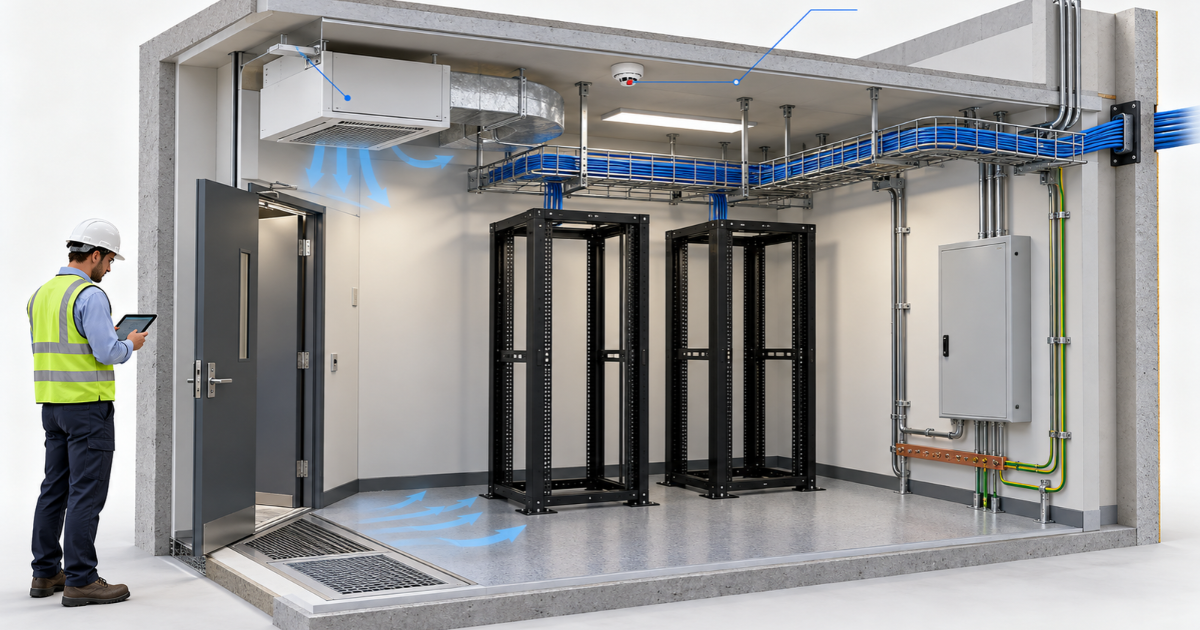
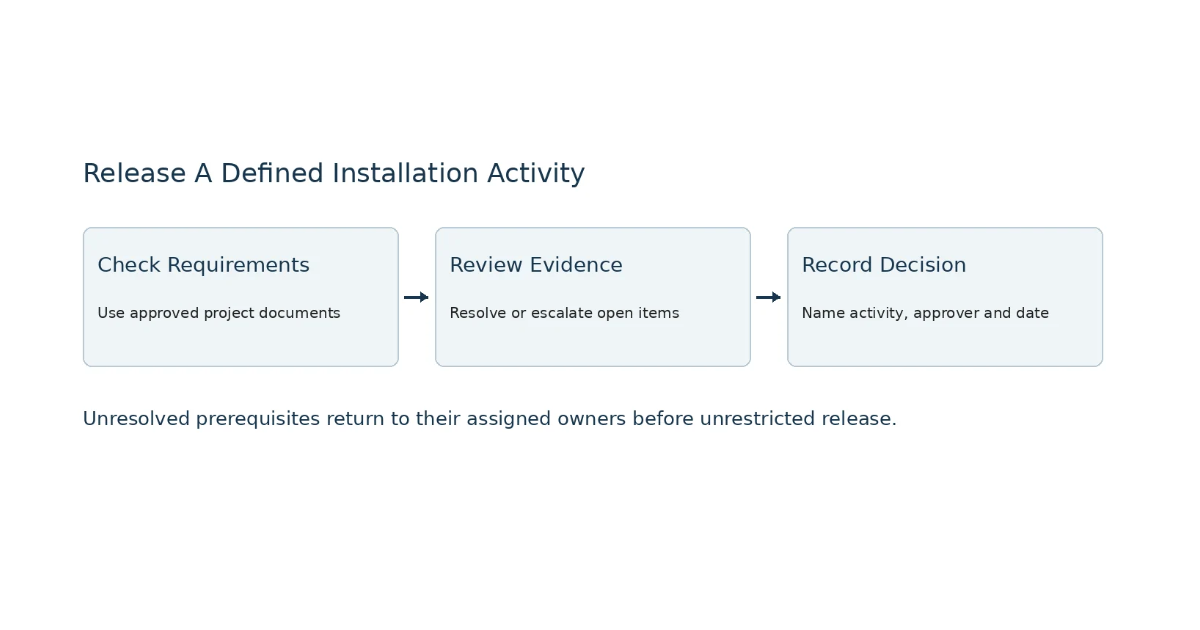
A communication room is ready for ICT equipment installation when its approved requirements have been checked, the responsible people have supplied evidence, and an authorised person has released it for a defined activity. A completed ceiling or an empty rack does not establish readiness on its own.
For facility and project managers in Saudi Arabia, a room-release matrix makes this decision easier to manage. It connects power, cooling, access, pathways, bonding, space and safety interfaces to an owner, a status and an evidence reference. Use the worksheet below to organise the review. Project engineers must set the design values and acceptance criteria; this guide does not supply universal technical limits.
What Does Ready For Installation Mean?
Define exactly what the release permits. Equipment delivery, rack mounting, electrical connection and energisation are different activities. A room might be suitable for receiving protected equipment while remaining unavailable for connection or operation. Record the permitted stage rather than marking the whole room ready without qualification.
Room release is also different from commissioning. It establishes whether the agreed prerequisites for installation have been accepted. Commissioning subsequently verifies installed systems against their specified requirements. Keep separate records for these stages so an early delivery approval cannot be mistaken for permission to energise equipment.
Start with a room identifier, location, intended activity and target date. Add the approved drawing revision, equipment schedule and person authorised to accept the release. If the equipment or layout changes, review the affected checks again. For wider planning context, see nowa’s data centres and communication rooms offering.
Establish The Approved Requirements And Responsible Owners
Build the checklist from the actual project documents. Obtain the room layout, rack elevations, equipment schedule, electrical arrangements, cooling requirements and coordinated pathway drawings. Reference the installation manuals for the selected equipment, including its mounting, environmental and service-access requirements.
Manufacturer guidance illustrates why generic values are unreliable. Cisco’s site preparation guidance addresses environmental conditions, grounding, cabinet suitability and clearances for a specific switch. Its values should not be copied into a checklist for different equipment.
Assign one accountable owner to each readiness item. That person may coordinate several contributors, but the matrix needs someone who can obtain the evidence and close the action. Distinguish the person completing the work from the engineer or representative accepting it.
Agree these responsibilities before the installation date. Confirm which tasks belong to the landlord, main contractor, electrical contractor, mechanical contractor, ICT installer and client. The final allocation must follow the project agreements rather than assumptions about a supplier’s general service description.
Check The Seven Room Readiness Interfaces
Review the interfaces together against the intended installation stage. The following checks are coordination prompts. They do not replace engineered designs, specialist inspections or project approvals.
Power Readiness
Ask the electrical team to confirm that the specified supply arrangements match the approved equipment load and installation plan. Record the relevant circuit identifiers, distribution information, connection arrangements and any specified backup-power provisions. Do not assume an uninterruptible power supply is included simply because the room contains network equipment.
Request the inspection or test documentation required by the project, with its acceptance status and responsible reviewer. A photograph of an outlet cannot establish electrical suitability. Managers should track the evidence; qualified personnel must perform electrical verification and control any energisation permissions.
Cooling And Environmental Readiness
Confirm that the mechanical design addresses the approved equipment schedule and intended operating hours. Identify who accepts the cooling provision and what evidence demonstrates readiness for the stage being released. Record any environmental monitoring or alarm interfaces specified for the room.
A brief walk-through showing that the room feels cool is insufficient evidence of its intended operating performance. Where equipment will operate beyond office hours, confirm the agreed cooling arrangements for those periods. Keep construction dust, moisture and unfinished work in the review, using the selected equipment’s requirements rather than a universal temperature or humidity range.
Access And Delivery Readiness
Check who can unlock the room, authorise entry and supervise installation. Confirm the delivery route from unloading point to final equipment position, including doors, lifts and any access restrictions relevant to the supplied equipment.
Record booking requirements, permitted working hours and the person coordinating building security. If delivery depends on another contractor removing stored materials, assign that action and obtain closure evidence. An accessible room is not necessarily accessible to the equipment being delivered.
Pathway Readiness
Compare the installed pathways and room entries with the current coordinated drawings. Identify incomplete supports, obstructed routes and interfaces awaiting another trade’s work. Record drawing references and inspection evidence rather than relying on a general statement that cabling routes are complete.
TIA’s pathways and spaces guidance identifies telecommunications pathways and spaces as a design subject and directs users to consider application requirements, regulations and equipment suppliers. Project designers must establish the applicable criteria and standards. For adjacent cabling planning, consult nowa’s structured cabling guide.
Bonding And Earthing Readiness
Identify the approved bonding and earthing design, the contractor responsible for completing it and the qualified reviewer accepting the work. List the inspections or test records required by the project, with the exact room and equipment references they cover.
Do not accept a visible conductor as proof that the complete arrangement is suitable. The responsible specialist must determine the required connections, verification methods and acceptance values. The matrix records their evidence and approval; it does not instruct facility staff to make connections or carry out electrical tests.
Space And Layout Readiness
Check the room against the approved rack positions and equipment dimensions. Include door movement, cable entry, installation access and the space needed to maintain or replace equipment. Confirm that the selected rack or cabinet accommodates the actual equipment and its airflow arrangement.
Compare field conditions with the design rather than judging the room by appearance. Record any clashes with building services or stored materials. Future allowance should also follow the agreed design brief. nowa’s network infrastructure solutions provide related context for coordinating the room with the planned network.
Safety And Building System Interfaces
Ask the responsible specialists to identify the applicable fire, building and construction-work requirements. Depending on the project, the review may include penetration treatment, fire-system interfaces, access arrangements and work permits. Record the evidence and acceptance authority for each relevant item.
An installation team should not infer approval from the absence of visible defects. Outstanding safety interfaces require review by the authorised project personnel. This worksheet is a coordination record, not a compliance certificate or a substitute for authority approvals.
Complete The Room Release Matrix
Use one matrix for each room and define the installation stage. Enter the acceptance requirement before the inspection, citing the drawing, specification or equipment manual that establishes it. Replace suggested role names with the named project owners.
Use consistent statuses: Not Checked, Pending Evidence, Blocked, Accepted, or Not Applicable With Reason. These are suggested management labels. “Accepted” should identify the evidence reviewed and the person accepting it. “Not Applicable” needs a documented reason and approval rather than an empty cell.
| Interface |
Acceptance Requirement |
Owner |
Evidence / Status |
| Power |
Approved supply and qualified verification |
Assign |
Record Reference |
| Cooling |
Equipment conditions and operating schedule |
Assign |
Record Reference |
| Access |
Authorised entry and equipment delivery route |
Assign |
Record Reference |
| Pathways |
Coordinated routes and inspected entries |
Assign |
Record Reference |
| Bonding |
Approved design and specialist acceptance |
Assign |
Record Reference |
| Space |
Equipment fit and maintenance access |
Assign |
Record Reference |
| Safety Interfaces |
Applicable project approvals and interfaces |
Assign |
Record Reference |
Room ID: __________ Activity To Be Released: __________ Drawing Revision: __________
| Area |
Acceptance Requirement |
Owner |
Status |
Evidence |
Action / Due |
Release Decision |
| Power |
Approved supply and qualified verification — enter approved reference |
Electrical Lead |
Not Checked |
Enter Report / Drawing ID |
Action: ____
Due: ____ |
Approver: ____
Decision: ____ |
| Cooling |
Equipment conditions and operating schedule — enter approved reference |
Mechanical Lead |
Not Checked |
Enter Report / Drawing ID |
Action: ____
Due: ____ |
Approver: ____
Decision: ____ |
| Access |
Authorised entry and equipment delivery route — enter approved reference |
Facility / Security Lead |
Not Checked |
Enter Report / Drawing ID |
Action: ____
Due: ____ |
Approver: ____
Decision: ____ |
| Pathways |
Coordinated routes and inspected entries — enter approved reference |
Pathway / ICT Lead |
Not Checked |
Enter Report / Drawing ID |
Action: ____
Due: ____ |
Approver: ____
Decision: ____ |
| Bonding |
Approved design and specialist acceptance — enter approved reference |
Electrical Specialist |
Not Checked |
Enter Report / Drawing ID |
Action: ____
Due: ____ |
Approver: ____
Decision: ____ |
| Space |
Equipment fit and maintenance access — enter approved reference |
ICT / Design Lead |
Not Checked |
Enter Report / Drawing ID |
Action: ____
Due: ____ |
Approver: ____
Decision: ____ |
| Safety Interfaces |
Applicable project approvals and interfaces — enter approved reference |
Relevant Safety Specialist |
Not Checked |
Enter Report / Drawing ID |
Action: ____
Due: ____ |
Approver: ____
Decision: ____ |
Release Authority: __________ Date: __________ Restrictions: ____________________
For every outstanding item, record the action owner, due date and evidence needed to close it. Where several actions affect one interface, add linked rows or an action-register reference. Keep evidence identifiable: room number, inspection date, document revision and report reference are more useful than an unlabelled folder of photographs.
Complete the release record with the permitted activity, restrictions, approving person and date. Make clear whether any accepted exception applies only to delivery or mounting. Electrical connection and energisation must retain their own required permissions. A matrix with all rows populated is still awaiting release until the authorised decision is recorded.
Resolve Outstanding Items Before Release
Review open items with the relevant owners before confirming the installation booking. Establish whether each item prevents the intended activity or requires another authorised decision. Do not calculate an overall readiness percentage: several accepted rows cannot compensate for a critical unresolved prerequisite.
For an item awaiting evidence, distinguish unfinished work from work that has been completed but not accepted. Both need action, but the next step differs. One may require physical correction; the other may require an inspection, a report or review of an existing submission.
Record exceptions only through the agreed approval process. State the restricted activity, reason, controls, responsible person and expiry or review trigger. Do not allow a general project-management exception to override a safety requirement. Reinspect affected items after corrections and update the release decision.
Use A Worked Room Release Example
Consider a hypothetical communication room in a Saudi commercial facility. This is an illustrative coordination example, not a nowa project or a verified site case study.
The project manager schedules switch installation for the following week. The rack layout has been accepted, and the delivery route is clear. However, cooling outside occupied hours has not been confirmed, and the electrical acceptance report is still pending.
The matrix records cooling as Pending Evidence, assigns the mechanical lead and specifies the operating-arrangement evidence needed. It separately records the electrical prerequisite, its responsible owner and the outstanding acceptance report. Neither item is treated as closed because the racks are installed.
The authorised project representative reviews what work, if any, can proceed under a restricted release. Equipment energisation remains subject to the required approvals. Once the missing evidence is accepted, the affected rows and release record are updated. The benefit is a traceable decision with named actions rather than an informal message that the room is nearly ready.
Use A Worked Room Release Example
Consider a hypothetical communication room in a Saudi commercial facility. This is an illustrative coordination example, not a nowa project or a verified site case study.
The project manager schedules switch installation for the following week. The rack layout has been accepted, and the delivery route is clear. However, cooling outside occupied hours has not been confirmed, and the electrical acceptance report is still pending.
The matrix records cooling as Pending Evidence, assigns the mechanical lead and specifies the operating-arrangement evidence needed. It separately records the electrical prerequisite, its responsible owner and the outstanding acceptance report. Neither item is treated as closed because the racks are installed.
The authorised project representative reviews what work, if any, can proceed under a restricted release. Equipment energisation remains subject to the required approvals. Once the missing evidence is accepted, the affected rows and release record are updated. The benefit is a traceable decision with named actions rather than an informal message that the room is nearly ready.
Confirm Scope Before Appointing An ICT Partner
Use the matrix when evaluating an ICT proposal. Ask who reviews room readiness, who completes each enabling task and who supplies the acceptance evidence. Confirm whether electrical work, cooling, pathways, bonding and building-system interfaces are included, excluded or provided by others.
Ask how outstanding items are escalated and whether installation bookings depend on an accepted release record. Request the proposed handover documents and agree how changes to equipment or room layouts will be handled. These questions help compare responsibility and evidence without assuming every proposal includes the same work.
nowa advertises ICT assessment, engineering design, installation, testing, integration, commissioning and handover. Discuss your equipment schedule and readiness matrix through its ICT infrastructure enquiry page, then confirm the project-specific scope and responsibilities in the agreed proposal.
Frequently Asked Questions
Who Should Approve A Communication Room For Installation?
The project should name the person authorised to release the room and identify the specialists accepting each technical interface. A project manager may coordinate the process, while electrical, mechanical and ICT reviewers assess their assigned requirements. Approval responsibilities should follow the contract and project procedures, with the permitted installation activity clearly recorded.
Can Equipment Be Delivered Before The Room Is Released?
Delivery may be considered separately from mounting, connection and energisation. The authorised team must assess the delivery route, storage conditions, protection arrangements and remaining work. Any restricted permission should state exactly what is allowed. A delivery approval does not establish that the room or equipment is ready for operation.
Is Room Release The Same As System Commissioning?
No. Room release records acceptance of the prerequisites for a defined installation activity. Commissioning concerns verification of installed systems against specified requirements. Keep these decisions separate and retain their supporting records. Installing equipment in a released room does not automatically prove that the completed network or associated building systems perform correctly.
What If Cooling Operates Only During Office Hours?
Refer the issue to the mechanical designer and operational owner. They must compare the cooling arrangements with the intended equipment operating schedule and approved requirements. Record the resulting decision and supporting evidence. Do not assume that an occupied-hours cooling arrangement supports equipment intended to run outside those hours.
How Should Not Applicable Items Be Documented?
Record why the item does not apply, the relevant design or scope reference, and the person accepting that conclusion. Use a specific explanation linked to the room and installation stage. Leaving a row blank makes it unclear whether the item was reviewed, overlooked or excluded without agreement.
When Should An Accepted Room Be Reinspected?
Review affected checks when equipment, drawings, layouts or installation stages change, or when later construction work alters accepted conditions. Reinspection may also be required by project procedures or an exception’s review date. Identify which previous evidence remains valid and obtain fresh acceptance for the items affected by the change.
-p-500.png)